Polecat Blur Downloads
Your first installation includes fourteen days of full operation.
No licence code is needed during that period; activate with a commercial licence code after purchase to continue using Polecat Blur.
Mac Download
System requirements:
- Apple Silicon Mac (M1 or later). Intel Macs are not supported.
- macOS 12.0 (Monterey) or later
- 8 GB RAM minimum; 16 GB recommended for larger projects
- 250 MB of free storage for the application, plug-in, presets, and updates
- 1280 × 720 display resolution minimum; 1920 × 1080 recommended
- An audio interface and current driver for low-latency standalone use
- A 64-bit VST3- or AU-compatible multichannel DAW or compatible host to take full advantage of Polecat Blur's surround features
- An administrator password to run the system-wide installer
Windows Download
System requirements:
- Windows 10 (64-bit) or later
- Intel Core i5 or AMD Ryzen 5 processor, 2.5 GHz or faster
- 8 GB RAM minimum; 16 GB recommended for larger projects
- 250 MB of free storage for the application, plug-in, presets, and updates
- 1280 × 720 display resolution minimum; 1920 × 1080 recommended
- An ASIO-compatible audio interface and current driver for low-latency standalone use
- A 64-bit VST3-compatible multichannel DAW or compatible host to take full advantage of Polecat Blur's surround features
- Administrator access to run the system-wide installer
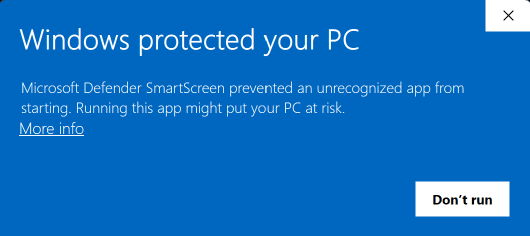
Security warning dialog on Windows
Polecat Blur is digitally signed and timestamped with a verified code signing certificate issued to Jeremy Murray-Wakefield. Because that certificate is new, Windows SmartScreen may still show the warning below until it has seen enough installations to establish the installer's reputation.
When the dialog appears, click on 'More info' to see the verified publisher name, then 'Run anyway' to continue.